In short
- Two wayson the business's tablet or via QR code or link on the customer's own phone.
- For the customerno app, no account – a phone camera and browser are enough.
- In all 16 templatesEvery industry template has a signature field, with your note above it.
- Proofthe signature as an image in the work order; from the customer's phone also the time and the choice for email and SMS, including the wording.
- SecurityThe link is valid for 24 hours, works only once and is only stored as a hash.
- Limita simple electronic signature – not a qualified electronic signature and no substitute for statutory written form.
- PriceTaskly subscription for €19 a month incl. VAT – try it free for 30 days, no credit card.
Way 1: the customer signs on the tablet
The familiar way at the counter or at the customer's site – just like a paper ticket, only with a finger instead of a ballpoint pen. Taskly runs in the browser, so it works on an iPad just as well as on an Android tablet, a phone or a PC.
- Fill in the job. Choose a template, enter the customer, device or vehicle, fault and price.
- Choose “Sign here”. This is the default for “Where does the customer sign?”; Taskly remembers on the device which way you chose last.
- Hand over the tablet. Above the field is your note, for example on liability, storage or the approval limit. The customer signs with a finger in the signature field. Made a mistake? “Clear” and try again.
- Save. Taskly assigns the job number. If you want, print the work order or send it to the customer by email.
This suits when the customer is standing in front of you, doesn't have a smartphone with them or would rather not sign on their own phone. There's no question about messages by email and SMS this way – only the page on the customer's phone asks that.
Way 2: the customer signs on their own phone
The customer reads the details in peace on their own screen and signs there. You don't hand anything over, and you can take in the job even if the customer isn't there at all.
- Choose “On the customer's phone (QR code)” and save the job. The signature can still be missing at this point.
- Show the QR code. Taskly shows a large QR code. The customer scans it with their phone camera, and the “Check & sign” page opens in the browser.
- Or send the link. If the customer isn't in front of you, send the link by email – or by SMS if your business is enabled for SMS. With “Copy link” you pass it on another way.
- Follow along live. At the counter, the display changes from “Waiting for the customer …” to “Opened – the customer is checking” to “Signed ✓”. The signature is on the job straight away.
- Carry on working. With “Continue – link stays valid” you close the window. In the job list, the job is marked “awaiting signature”. If the customer signs on the tablet after all, the link automatically becomes invalid.
If a saved job is missing the signature, get it later in the job view with “Signature on customer's phone”.
Sign at check-in already
If you use self check-in via QR code at the counter, you can switch on that the customer reads your template's notes and signs right there. Then no signature is needed on site: Taskly copies it into the job and notes if the note has changed since.
What the customer sees on their phone
- Header: your business's name, address and phone, job number, date and how long the link is valid.
- “Your details”: the job's fields, such as device, fault and price. Unlock codes and passwords only appear as ••••, photos not at all.
- “Important notes”: your note from the template, in your exact wording (not translated).
- “Messages about your job”: two optional ticks – messages by email (the customer can enter or correct the address) and – if a mobile number is on file – by SMS to that number. They can also sign without ticking.
- “Confirm and sign”: a required tick “I agree to the details and notes above.”, the signature field and the “Sign and send” button.
- Privacy: who is responsible for the data (your business), your contact details and – if you've added one – a link to your own privacy policy.
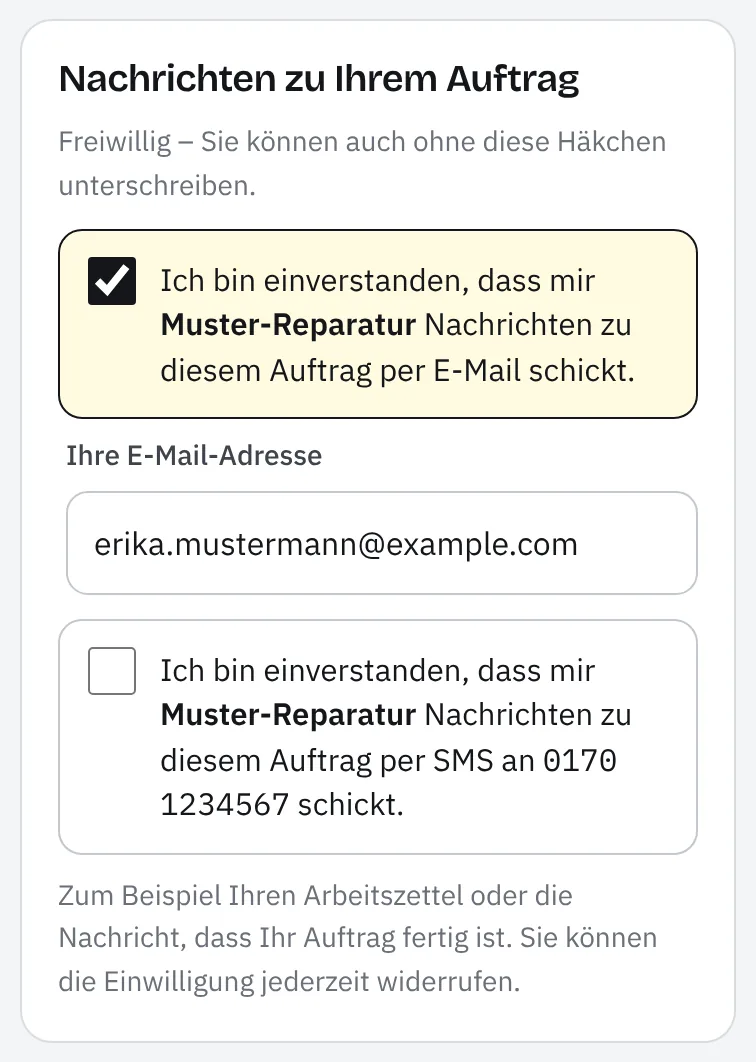
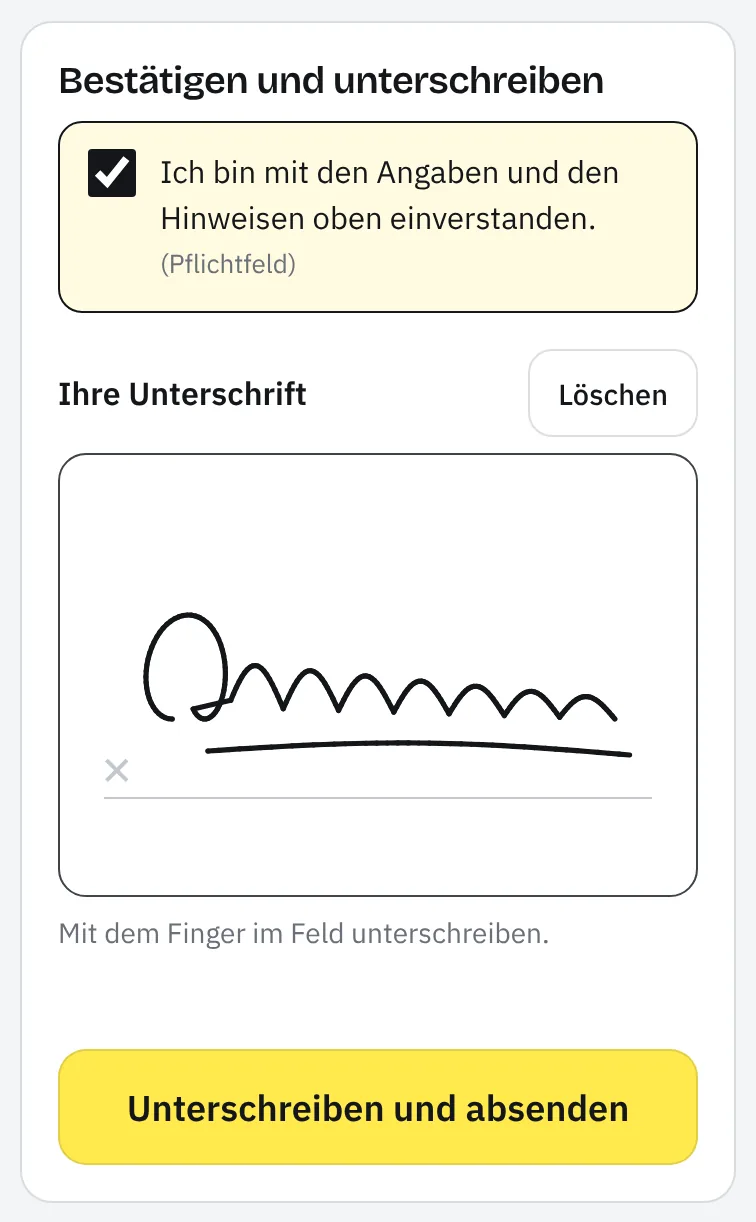
The page's texts are available in eight languages: German, English, Turkish, Arabic (right to left), Russian, Ukrainian, French and Spanish. What counts is the language the app was set to when the job was created. After sending, the customer sees “Thank you!” and can view their work order, save it as a PDF or print it.
What Taskly stores
| Signature | as an image in the signature field of the work order – on the tablet and on the customer's phone alike |
|---|---|
| Notes | The template is saved with the job. If your note changes later, the job keeps the wording from the day of intake. |
| Consents | only from the customer's phone (also at check-in): yes or no for email and for SMS, with date and time, the address or number it applies to, and the language and version of the text shown |
| Link | the times at which it was created, opened and used; the link itself only as a cryptographic hash |
| History | Entries such as “Signature requested” and “Signed”, with the customer's choice and a shortened address |
| Email address | If the customer enters one, it's on the job and in your customer records. |
| Printout | below the signature a line such as “Signed digitally on … (customer's phone) · Email: yes · SMS: no” |
Once the customer has chosen, messages about this job only go via the channels they agreed to, and only to the address or number they gave – even if someone in the team wants to resend. If they later no longer want messages via a channel, tap “Record withdrawal” on the job. This data belongs to the job and is deleted with it; the database and files are stored in the EU. Details are in the privacy policy, section 8.
How the link is protected
- It contains a random identifier that can't be guessed.
- It's valid for 24 hours. After that the customer sees “Link expired”, and you generate a new QR code if needed.
- It only works once. After signing it shows “Already signed” – even from two phones at the same time, it can't be signed twice.
- A new QR code, “Cancel” or a cancelled or collected job makes the old link invalid immediately.
- Taskly only stores a cryptographic hash of the identifier, not the link itself; the server logs don't contain it either.
- The page is excluded from search engines, sets no cookies and doesn't pass on any address when you leave. The number of requests per IP address is limited.
- Previews in messengers such as WhatsApp get a neutral page without job details.
The legal side in three sentences
For repair and workshop orders, German law usually doesn't prescribe a particular form; the signature mainly serves as proof that the customer placed the order and read the notes. The finger signature is a simple electronic signature and doesn't replace a handwritten signature on paper where the law exceptionally requires written form. How much it proves in a dispute is assessed by the court case by case – the time, the wording of the notes and the fixed link to the job can help.
This classification is general and not legal advice. If in doubt, your chamber or a lawyer can help. What applies to signatures in Taskly is set out in the terms of use, section 6.
What the signature in Taskly is not
- Not a qualified electronic signature. Taskly works without a certificate and without ID checks. For contracts that need a qualified signature or written form, Taskly isn't the right tool.
- No identity check. Taskly doesn't check who is signing – just like a paper ticket. So only show the QR code or send the link to the person whose job it is.
- Not a platform for any document. What gets signed is the work order in Taskly, not an uploaded PDF.
- Not without internet. Signing on the customer's phone needs a connection on both sides; Taskly also needs one to save on the tablet.
- SMS only on request. Every business can send the link by email; SMS is available on request for enabled businesses.
Which businesses it suits
The signature is built into all 16 industry templates. So every job can be signed digitally – from the repair ticket in a phone shop and the workshop order to the job sheet in the trades. What this looks like day to day is shown on the pages for the phone shop, the car workshop and the bike workshop; you'll find all templates under industries. Prefer paper first? The repair order template and the car workshop order are available free as PDFs.
What it costs
The digital signature – on the tablet and on the customer's phone – is part of the Taskly subscription for €19 a month incl. VAT – try it free for 30 days, no credit card. SMS is available on request for enabled businesses; write to us if you'd like to use SMS. Pricing and limits in detail
Digital signature FAQ
Does the customer need an app or an account?
No. The customer scans the QR code with their phone camera and the page opens in the browser. They don't need an account, an app or a password, and the page sets no cookies.
What if the customer doesn't have a smartphone?
Then they sign directly on the tablet. If they don't want to sign digitally at all, print the work order and have them sign on paper. In your own templates you can also set the signature as optional.
Is a signature on a tablet legally valid?
For typical repair and workshop orders, German law usually doesn't prescribe a particular form. The finger signature then serves as proof that the customer placed the order and read the notes. It's a simple electronic signature and isn't enough where statutory written form is required in exceptional cases. This information is no substitute for legal advice.
How long is the link valid – and what if it has expired?
The link is valid for 24 hours and only for one signature. If it has expired, tap “Generate new QR code” in the QR window or request the signature again in the job view. The old link then becomes invalid.
Can I send the link by email, SMS or messenger?
By email directly from Taskly, by SMS if your business is enabled for it (on request). With “Copy link” you can also pass it on another way; previews in messengers such as WhatsApp show no job details. Only send the link to the person whose job it is.
Does the customer see the unlock code or the photos?
No. Codes and passwords only appear hidden as •••• on their page, and photos aren't shown at all. On the job itself they stay visible to your team.
Does the customer get a copy?
Yes. After sending, they can view the work order straight away, save it as a PDF or print it. If “Inform customer by SMS/email” is ticked when saving, Taskly also sends them the work order after signing – but only via the channels they agreed to.
Can my team set the ticks for email and SMS?
No. Only the customer sets these ticks on their phone. On the job, your team can only record a withdrawal – after that nothing more goes out via that channel. Nobody except the customer can add consent afterwards.
Last updated: 15/10/2026 · Taskly, E-Studio, Iserlohn