In short
- Who forsmall independent car workshops that currently keep jobs on a carbon-copy order pad or in job folders.
- Whatdigital workshop order with vehicle details, complaint, existing damage with photos, estimate, approval limit and the customer's signature – plus status through to collection, customer records and an invoice from the job.
- DevicesTablet, phone or PC with a browser – nothing to install.
- PriceTaskly subscription for €19 a month or €190 a year (2 months free), each incl. VAT – try it free for 30 days, no credit card, cancel monthly, with annual payment at the end of the 12 months.
- Not includedno dealer management system (DMS), no parts catalogue, no labour time database, no till system.
How vehicle intake works with Taskly
Whether at the reception desk or when taking the car in directly at the vehicle: the steps are the same as on the paper pad – just without copying things out and without handwriting nobody can read later.
- Record the customer. For regular customers, start the job from the customer records; their contact details are then already filled in. New customers can enter their contact details themselves if they like: scan the QR code at the counter, fill in the form on their own phone, done.
- Record the vehicle. Photograph the vehicle registration document with “Photo instead of typing” – Taskly takes over whatever is clearly on it, such as the number plate, VIN and make and model. Then type in the mileage, choose the fuel level from “Reserve” to “Full” and note when the HU/AU (roadworthiness and emissions test) is due.
- Work and complaint. Tap the work – service, oil change, brakes, tyre change and more. What the customer describes, for example “squeaks when braking, front left”, goes into the “Customer request / complaint” field. Instead of typing, you can also dictate the job; Taskly pre-fills the recognised fields and you check them.
- Record existing damage. On your walk around the vehicle, note scratches, dents or stone chips under “Existing damage at intake” and photograph them. If you'd rather take photos with your phone, use “Photos from phone”: scan the QR code in the form, photograph all round the vehicle – the pictures appear straight away in the open job.
- Estimate and approval. Enter the estimate amount, any deposit and the ready date. In the “Approved without asking up to” field you record the amount up to which you may carry on working without calling.
- The customer's signature. The customer signs with a finger on the tablet – or via QR code on their own phone. There they see the details and the note, confirm both with a tick, decide for themselves whether they want messages by email or SMS, and sign.
- Printout and copy. Taskly assigns the job number, prints the workshop order on A4 straight away if you want – for the job folder, for example – and, if the customer gave an email address, sends them a link to their job.
- In progress, done, collected. The status moves from “Received” through “In progress” to “Ready”. If a part is missing, put it on the order list linked to the job. One tap on “Ready” and the customer is notified by email that they can collect their vehicle. You create the invoice from the items under “Parts & labour units”; customer, items and deposit are carried over.
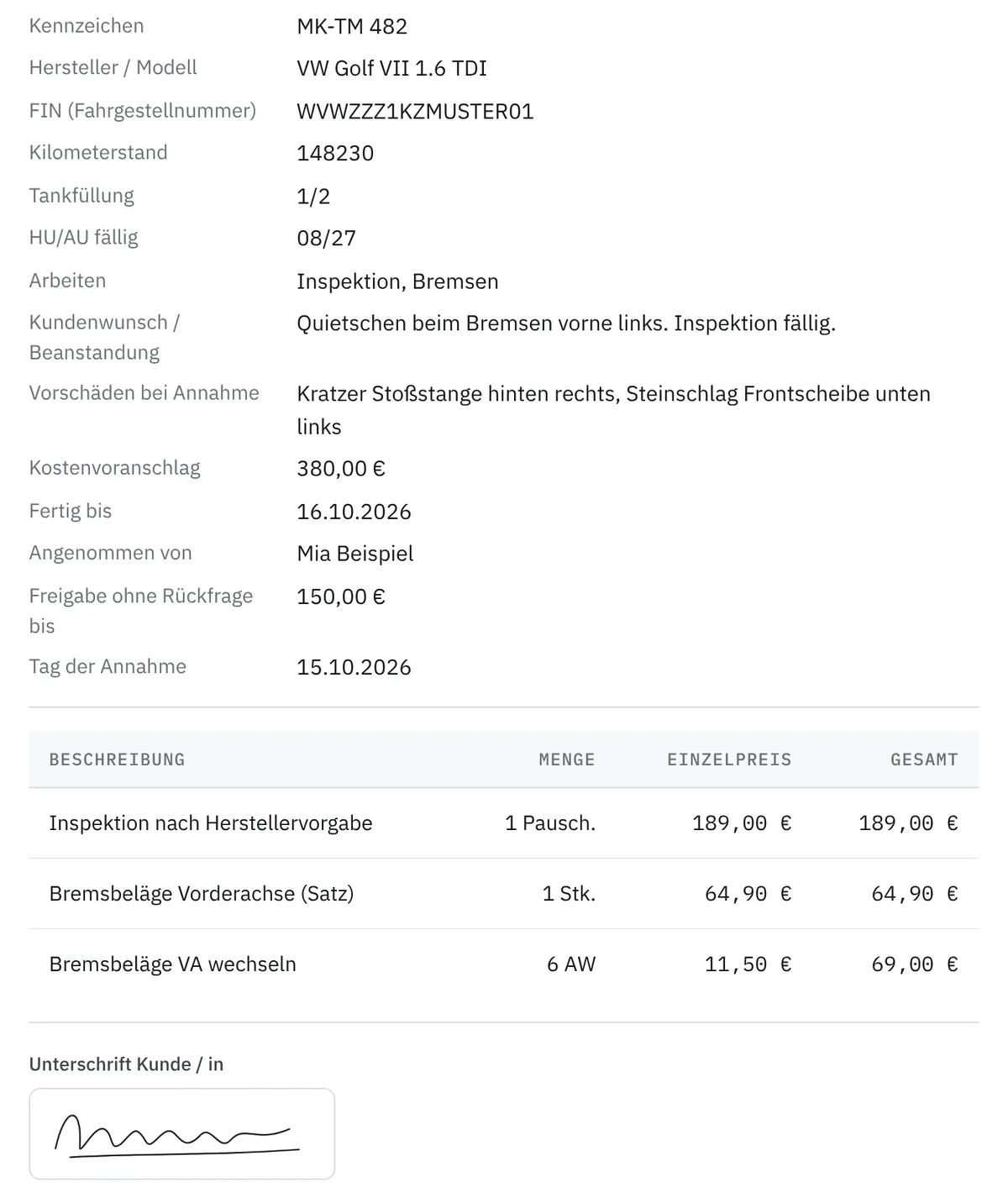
These are the fields on the workshop order
The “Car workshop” template is laid out like a classic paper workshop order. No field is required – when you save, Taskly reminds you once about name, contact, job and signature; the signature can be added at any time.
| Section | Fields |
|---|---|
| Customer | Title, first name, last name, company, address, phone, email |
| Vehicle | Number plate, make / model, VIN (vehicle identification number), mileage, fuel level (reserve, 1/4, 1/2, 3/4, full), HU/AU due (month/year) |
| Work | to tap: service, oil change, brakes, tyre change, HU / AU, air-con service, read fault memory, exhaust, clutch, timing belt, battery, electrics – plus a field for further details |
| Vehicle intake | Customer request / complaint, existing damage at intake |
| Photos | Photos at intake |
| Job | Estimate, deposit, ready by, received by (fills itself in), approved without asking up to, date received (fills itself in), work carried out |
| Parts & labour units | Items with description, quantity, unit and unit price; Taskly calculates the total |
| Signature | Signature of the customer |
Missing something – a tick for “Old parts returned” or a field for the courtesy car, say? Add it in the template builder; the printout and customer link adapt. Search also finds jobs by number plate or VIN. For paper, there's the car workshop order as a free template to print or as a PDF, plus more templates.
Approval limit and existing damage: why they belong on the job
Approval limit. If it turns out during the work that more needs doing, the workshop has to know how far it may go. If the signed job says “Approved without asking up to €300”, that's settled – above that, you call. That means fewer surprises at collection, and you don't have to pick up the phone for every little thing.
Existing damage. A scratch on the bumper, a stone chip in the windscreen: whatever was already there at intake is on the job with text and photo before anyone works on the vehicle. The customer sees the text when signing. The photos stay internal – they don't appear in the customer's link – and are attached to the job if anyone asks later.
The note on the workshop order
Below the details there's a pre-filled note you can change freely. In the template it reads:
“By signing, the customer places the order for the work listed above. Test drives and transfer drives are permitted. Work beyond the approved amount is only carried out after consultation. The vehicle remains in the workshop's possession until paid in full (contractor's lien).”
This is a suggested wording, not a vetted model clause. Adapt it to your order terms and have it checked legally if needed, for example through your trade guild or chamber. Taskly is no substitute for legal advice. On the signing page, which is available in eight languages – including Turkish, Arabic, Russian and Ukrainian – the note appears in German.
After collection: a reminder for the next service
In every job, under “Further details”, you can enter the next service or inspection, such as the next service or the HU – as a date or with one tap on “in 12 months” (also 6 or 24). The date appears in your calendar. If the service reminder is switched on under Settings → Automations, Taskly reminds the customer in good time beforehand, with a link to online booking if you offer it, otherwise with your phone number. Taskly only sends it to customers who agreed on their own phone – when signing or at check-in – to messages by email or SMS, and every reminder includes an unsubscribe link.
Important: the service reminder counts as advertising. The question on the customer's phone, however, only asks about messages regarding the job – whether that's enough for a reminder about the next service is for you to check. Only switch it on if you have suitable consent. These notes are not legal advice.
If a finished vehicle stays on the forecourt for a while, the collection reminder can write to the customer up to three times – also under Settings → Automations. Messages go by email; SMS is available on request for enabled businesses.
Data protection in the workshop
- The customer's link shows their workshop order and the progress of the work, but no photos.
- If the customer signs on their own phone, they decide there for themselves whether they want messages by email or SMS. Taskly stores their choice with the time and wording as proof.
- Photos and voice recordings for AI capture are only processed for recognition and are not stored – unless you deliberately attach a photo to the job.
- The database and files are stored in the EU. The data processing agreement under Art. 28 GDPR is part of signing up.
What Taskly costs
Taskly costs €19 a month or €190 a year (2 months free), each incl. VAT – one plan, all features, cancel monthly, with annual payment at the end of the 12 months. You try it free for 30 days with no credit card; the trial ends automatically without anything being charged. Your data stays readable and exportable afterwards. Limits: 2 GB of storage per business and 25 MB per file. SMS is available on request for enabled businesses; write to us if you'd like to use it. All details on pricing and limits
What Taskly is not
Taskly replaces the order pad and the job folder – not your workshop software. Taskly doesn't include a dealer management system (DMS), parts catalogues, a labour time database, a till system or interfaces to manufacturers, parts dealers or testing organisations. If you need all that in one program, classic car workshop software, as listed on comparison sites, is the better choice. Taskly fits when the paper job is the problem: intake, signature, photos, status and a simple invoice. When a carbon-copy pad is still enough is covered in the comparison Carbon-copy pad or tablet? You'll find all industry templates under industries.
FAQ from car workshops
Can I photograph the vehicle registration document instead of typing everything?
Yes. With “Photo instead of typing” you photograph the registration document, and Taskly enters whatever is clearly on it – such as the number plate, VIN and make and model. Check the values before saving. The photo is only used for recognition and isn't stored. If you're at a PC without a camera, scan a QR code and take the photo with your phone. The AI helper can be switched off per business.
Is a signature on a tablet valid?
For a workshop order, German law usually doesn't prescribe a particular form – it can usually even be agreed verbally. The finger signature mainly serves as proof that the customer has seen the job, approval limit and notes. It isn't a qualified electronic signature; where strict written form is required in exceptional cases, it isn't enough. This information is no substitute for legal advice.
Can I print the workshop order for the job folder?
Yes. If you want, Taskly prints the job on A4 right after saving – with intake photos and signature – and you can print it again from the job view at any time. You can also save it as a PDF via your device's print dialogue. If the customer gave an email address, they also get a link to their job.
Can several staff members work with Taskly?
Yes. Owners and staff each get their own login; up to 10 logins are included in the price. “Received by” fills itself in, and each job's history shows who changed what and when.
What does “Approved without asking up to” mean?
This is the amount up to which the workshop may carry on working without calling – for example if the service shows that the brake pads are due. The amount is on the job the customer signs, and the pre-filled note adds: work beyond that only after consultation. Taskly doesn't check automatically whether an amount has been exceeded – you keep an eye on that.
Does Taskly work in the workshop bay when the Wi-Fi is weak?
Taskly needs an internet connection to save. If it drops, the form reports “Not saved” and stays filled in. Taskly also keeps a new job as a draft on the device and offers it again after a reload. As soon as the connection is back, save once more.
Can I take parts and labour units from a catalogue?
No. Taskly has no parts catalogue and no labour time database. You enter parts and labour units yourself as items – with quantity, unit (for example “AW” or “hrs”) and unit price; Taskly calculates the total. You later create the invoice from these items.
What does Taskly cost for a car workshop?
Taskly costs €19 a month incl. 19% VAT per business – one plan with all features, cancel monthly. If you pay annually, it's €190 a year – 2 months free – 17% cheaper; you pay the 12 months in advance. You try it free for 30 days with no credit card; the trial ends automatically and nothing is charged. After that, your data stays readable and exportable – to keep working, you take out the subscription. Full details are on the Pricing page.
Last updated: 30/10/2026 · Taskly, E-Studio, Iserlohn