Download the workshop order – free, no sign-up
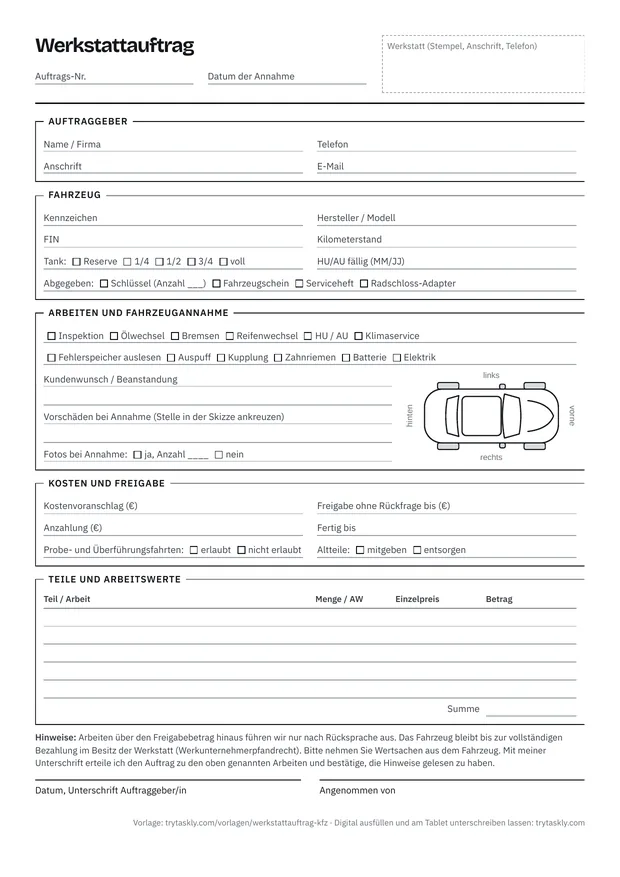
One A4 page for vehicle intake: customer, vehicle with number plate, VIN, mileage and fuel level, work to tick, complaint, existing damage with vehicle sketch, estimate, approval amount, test drive, parts and labour units, notes and signature.
You can print the form in your browser or save it as a PDF. You may use it for your workshop, adapt it and print it with your stamp or logo.
What is a workshop order?
A workshop order – depending on the business also called a job ticket, repair order or work order – records what the workshop is to do on a vehicle and on what terms. It's created at vehicle intake, at the counter or right by the car, and accompanies the vehicle until collection. Some workshops also use it as a job card for the workshop floor.
Legally, a workshop order is usually a contract for work under § 631 BGB (German Civil Code): the workshop owes the agreed work on the vehicle, the customer the payment. The law usually doesn't require a particular form for it – even an order by phone can be valid. The written workshop order with a signature is therefore above all a means of proof: it shows which work was ordered, up to what amount, and what condition the vehicle arrived in. This classification is general and not legal advice.
These details belong on the workshop order
| Detail | What it's for |
|---|---|
| Workshop (stamp), job number, date received | Who is taking the order and when. The number links the job, key and invoice. |
| Customer: name or company, address, phone, email | For queries, approval of additional work and the message that the car is ready. You need the address for the invoice. |
| Vehicle: number plate, make and model, VIN | Clear identification. The vehicle identification number (VIN, usually 17 characters) is in field E of the vehicle registration document and, unlike the number plate, always stays the same. |
| Mileage and fuel level at intake | Record how the vehicle was handed in – helpful if questions come up later about miles driven or the fuel level. |
| HU/AU due | Reminds the customer and the workshop of the next main inspection (HU) and can be the occasion for the next appointment. |
| Keys and documents handed in | Keys, registration document, service book, locking wheel nut adapter: whatever was handed in must go back complete. |
| Work and customer request or complaint | Defines the scope – for example “service to manufacturer's specification” or “check noise when braking, front left”. The more precise, the less dispute about what was ordered. |
| Existing damage at intake | Scratches, dents and stone chips that were already there – with a sketch or photo, before anyone works on the vehicle. |
| Estimate and approval amount | The cost limit and the amount up to which work may be done without asking. More on this in the next section. |
| Test and transfer drives | Whether the workshop may move the car for a test drive or, for example, to the testing station. |
| Old parts | Whether removed parts are given to the customer or disposed of. |
| Ready by, deposit | A date for the customer and for planning in the workshop; plus proof of what has already been paid. |
| Parts and labour units | What was fitted and how much working time is involved – the basis for the invoice. Labour units (AW) are units of time whose length is set differently depending on the manufacturer or workshop. |
| Workshop's notes | For example: consultation above the approval amount, contractor's lien, removing valuables from the vehicle. |
| Customer signature with date, “Received by” | The signature confirms the order, approval amount and notes. “Received by” shows who in the team took the car in. |
The notes on the form are a suggested wording and not legal advice. Have them checked for your workshop, for example through your trade guild, the chamber of crafts or a lawyer.
Approval amount, test drive and lien
Approval amount. If it turns out during the work that there's more to do than expected, the workshop needs a decision from the customer. If the signed job says, for example, “Approved without asking up to €250”, it's clear how far you may go without calling – above that, you ask. That saves phone calls about small things and discussions at collection. If an estimate has been agreed and is likely to be exceeded significantly, the workshop usually has to inform the customer without delay (§ 649 BGB).
Test and transfer drives. For a test drive after the repair or the drive to the testing station, the workshop moves someone else's vehicle. A cross on the job shows later that these drives were agreed, and the mileage noted at intake shows how far it has been driven since.
Lien until payment. Until the invoice is paid, the workshop may usually keep a repaired vehicle: the law gives it a lien on the customer's items that came into its possession for the repair (§ 647 BGB, contractor's lien). If the car doesn't belong to the customer, for example with leased vehicles, the situation is more difficult. A note on the job creates clarity but is no substitute for legal advice.
Vehicle intake: record existing damage before the work
Whatever was already there at handover belongs on the job before anyone works on the vehicle: the scratch on the bumper, the dent in the driver's door, the stone chip in the windscreen, the rim that has touched a kerb. Ideally, walk once around the vehicle with the customer before they sign. That way you both see the same thing, and there's less dispute at collection about whether damage is new.
On the form you mark the spot on the vehicle sketch and describe the damage in a few words, for example “scratch rear bumper left, approx. 10 cm”. Photos are even clearer. On paper, though, they're kept separately from the job – on a staff member's phone or in a folder on the PC – and are hard to find later.
In Taskly the photos belong to the job: the workshop order has its own “Photos at intake” section. You take photos on the tablet, or you scan a QR code and take them with your phone – the pictures appear in the open job. The photos stay internal; they don't appear in the link the customer gets.
Paper or digital?
| Section | Paper / Taskly |
|---|---|
| Vehicle details | Paper: copy from the registration document Taskly: photograph the registration document, Taskly enters the number plate, VIN, make and model – you check the values |
| Existing damage | Paper: a cross on the sketch, photos separate from the ticket Taskly: text and photos directly in the job |
| Signature | Paper: on paper Taskly: with a finger on the tablet or via QR code on the customer's phone |
| Copy for the customer | Paper: carbon copy or photocopy Taskly: link by email, printout on request |
| Job folder | Paper: put the ticket in Taskly: A4 printout for the folder; the job stays saved digitally |
| Finding it again | Paper: search binders by date Taskly: search by number plate, VIN, name or job number |
| Parts and labour units | Paper: enter by hand and add up Taskly: items with quantity, unit and unit price, Taskly calculates the total; you create the invoice from it |
| Report ready | Paper: phone the customer Taskly: one tap on “Ready”, message by email; SMS on request for enabled businesses |
| Without power and internet | Paper: always works Taskly: needs an internet connection to save |
| Cost | Paper: printing, pads, job folders, filing Taskly: €19 a month (try it free for 30 days) |
Who the switch pays off for and who's fine with paper is covered in the comparison Carbon-copy pad or tablet?
What Taskly is not
Taskly is a digital work order, not complete workshop software. There's no dealer management system (DMS), no parts catalogue, no labour time database, no till system and no connection to manufacturers, parts dealers or testing organisations. You enter parts and labour units yourself as items. If you need all that in one program, car workshop software will serve you better. Taskly is meant for workshops that want to get rid of the paper job: intake, signature, photos, status and an invoice from the job.
Fill in the workshop order digitally
- Create a free account and choose the “Car workshop” template. It contains the key details of this form: vehicle, work, complaint, existing damage, estimate, approval amount, parts and labour units and the customer's signature.
- Photograph the vehicle registration document (“Photo instead of typing”): Taskly enters whatever is clearly on it, such as the number plate, VIN and make and model, and you check the values. You type in the mileage and tap to choose the fuel level and work – or you dictate the details.
- The customer signs with a finger on the tablet or via QR code on their own phone. If they gave an email address, they get a link to their job. For the job folder, print the workshop order on A4.
Two differences from the form: the Taskly template permits test and transfer drives in the pre-filled note, and it has no separate field for keys and documents handed in or for old parts. Add both in the template builder if needed, for example as yes/no ticks.
How the whole vehicle intake works with Taskly – from the photo of the registration document to the message when the car is ready – is described on the digital workshop orders for car workshops page.
What the customer sees when signing and what Taskly stores is explained on the customer signature on a tablet or the customer's phone page.
For repairs outside the car workshop there's the general repair order template. You'll find all industry templates in Taskly under industries, and what Taskly costs under pricing.
Workshop order FAQ
Is the workshop order template free?
Yes – the whole workshop order with the vehicle sketch for existing damage and the table for parts and labour units, as a printable form in the browser and as a PDF. You don't need to sign up. You may use it for your workshop, adapt it and print it with your stamp or logo.
Is the workshop order available as a Word file?
No, there's no Word file, only the printable form in the browser and the PDF. If you're missing a field, such as a tick for a courtesy car, create it digitally in Taskly's template builder. You don't need the sketch there: you record existing damage with text and photos directly on the job.
Is a workshop order valid without a signature?
As a rule, yes. A workshop order is usually a contract for work, and the customer and workshop can also conclude it verbally or by phone. Without a signature, however, it's harder to prove in a dispute which work was ordered, which approval amount applied and which existing damage was already there. This information is no substitute for legal advice.
What does “Approved without asking up to” mean?
This is the amount up to which the workshop may carry on working without calling – for example if the service shows that the brake pads are due. If it costs more, the workshop asks first. If an estimate has been agreed and it looks as though it will be exceeded significantly, the workshop usually has to inform the customer without delay (§ 649 BGB).
May I charge for the estimate?
Only if agreed beforehand: under § 632 para. 3 BGB, an estimate is not to be paid for if in doubt. If, for example, the fault-finding for the estimate is to cost something, write this on the workshop order with the amount and have it signed. This information is no substitute for legal advice.
How long do I have to keep workshop orders?
The invoice for the repair is an accounting record and is usually kept for eight years. If it's based on the signed workshop order – for example on the parts and labour units on it – it's best to keep the order for just as long (§ 147 of the German Fiscal Code). Regardless of that, it's worth keeping it at least as long as the customer can claim defects in the repair – for work on a vehicle, usually two years from acceptance (§ 634a BGB). More on the periods is on the repair order template page; for individual cases your tax adviser can help. Not legal advice.
May the customer sign the workshop order on a tablet?
As a rule, yes. German law usually doesn't require a particular form for a workshop order; the finger signature documents that the customer has seen the work, approval amount and notes – on the tablet at the reception desk or via QR code on their own phone, for example when taking the car in directly at the vehicle. It's only different where statutory written form applies in exceptional cases; there it isn't enough. This information is no substitute for legal advice.
What does the digital version cost?
Taskly costs €19 a month incl. 19% VAT per business – one plan with all features, cancel monthly. If you pay annually, it's €190 a year – 2 months free – 17% cheaper; you pay the 12 months in advance. You try it free for 30 days with no credit card; the trial ends automatically and nothing is charged. After that, your data stays readable and exportable – to keep working, you take out the subscription. Full details are on the Pricing page.
Last updated: 16/10/2026 · Taskly, E-Studio, Iserlohn