In short
- Who forWorkshops, repair businesses, phone shops and other shops where customers hand something in or sign contracts.
- How they build upautomatically when you save a work order with a name and phone or email – also via self check-in, online booking, “Contracts from screenshot” or by hand.
- What's on the cardContact and notes, plus all the customer's work orders, contracts, invoices and files.
- Searchby name, company, phone number or email – numbers without spaces too.
- PrivacyData in the EU, data processing agreement, privacy mode for the screen at the counter.
- PriceTaskly subscription for €19 a month incl. VAT – try it free for 30 days, no credit card.
Why customer records in a workshop or shop?
At the counter you often hear: “I was here last year, about the screen.” With paper, the search through the folder of carbon copies begins. In digital customer records you type in the name or phone number and see the old jobs with their status, the current contract with its notice period and the last invoice.
In German, the word for customer records is best known from beauty and hair salons, where treatments are recorded. The customer records in Taskly are meant for businesses that work with jobs – repairs, workshops, trades, intake at the counter. They're attached to the work order and grow with it, without you maintaining a second customer database.
How the records fill themselves
- Save the work order. The name and phone number or email are on the work order anyway. When you save, Taskly looks for the matching customer card.
- Matching by phone number. The format doesn't matter: “0170 1234567”, “+49 170 1234567” and “0049 170 1234567” count as the same number. If it's known, the new job is attached to the existing card.
- Matching by email – only with a matching name. Without a known number, Taskly checks the email address. Because families or colleagues often share an address, it only merges if the name matches too.
- Nothing is overwritten. For regular customers, Taskly only fills in empty fields on the card, such as a newly given address. What's already on the card stays.
- Otherwise a new card. If the customer is unknown, Taskly creates a card. Without a phone number and without an email, none is created – so there are no duplicates from names alone. The work order is still saved.
The customer fields are the same in all included templates: title, first name, last name, company, address, phone and email. That's why matching works in every industry, whether it's a phone repair ticket or a job sheet at the customer's site.
Other ways into the records
- Self check-in: if a customer enters their own details via QR code, “Copy to work order” creates them in the records or finds them there.
- Online booking: in the calendar, you turn a booked appointment into a job with “Create work order from it”; the customer ends up in the records.
- Contracts from screenshot: if you import mobile contracts from a screenshot of your dealer portal, Taskly finds or creates the customer card by phone number.
- By hand: with “New customer” you create a card directly. Only the last name is required.
What's on the customer card
| Section | Content |
|---|---|
| Contact | Title, first name, last name, company, phone, email and address – with “Call” and “Email” buttons |
| Notes | free text, for example “prefers a call back after 5 pm” or “invoice to accounts department” |
| Work order | all the customer's jobs with job number, device or item and status; one tap opens the job |
| Contracts | Provider and tariff or description, plus “cancel by” with date – orange from 45 days before the deadline, red from 14 days |
| Invoices | Invoice number, date, status and amount |
| Files | Documents for the customer, such as a power of attorney, a quote or photos – up to 25 MB per file |
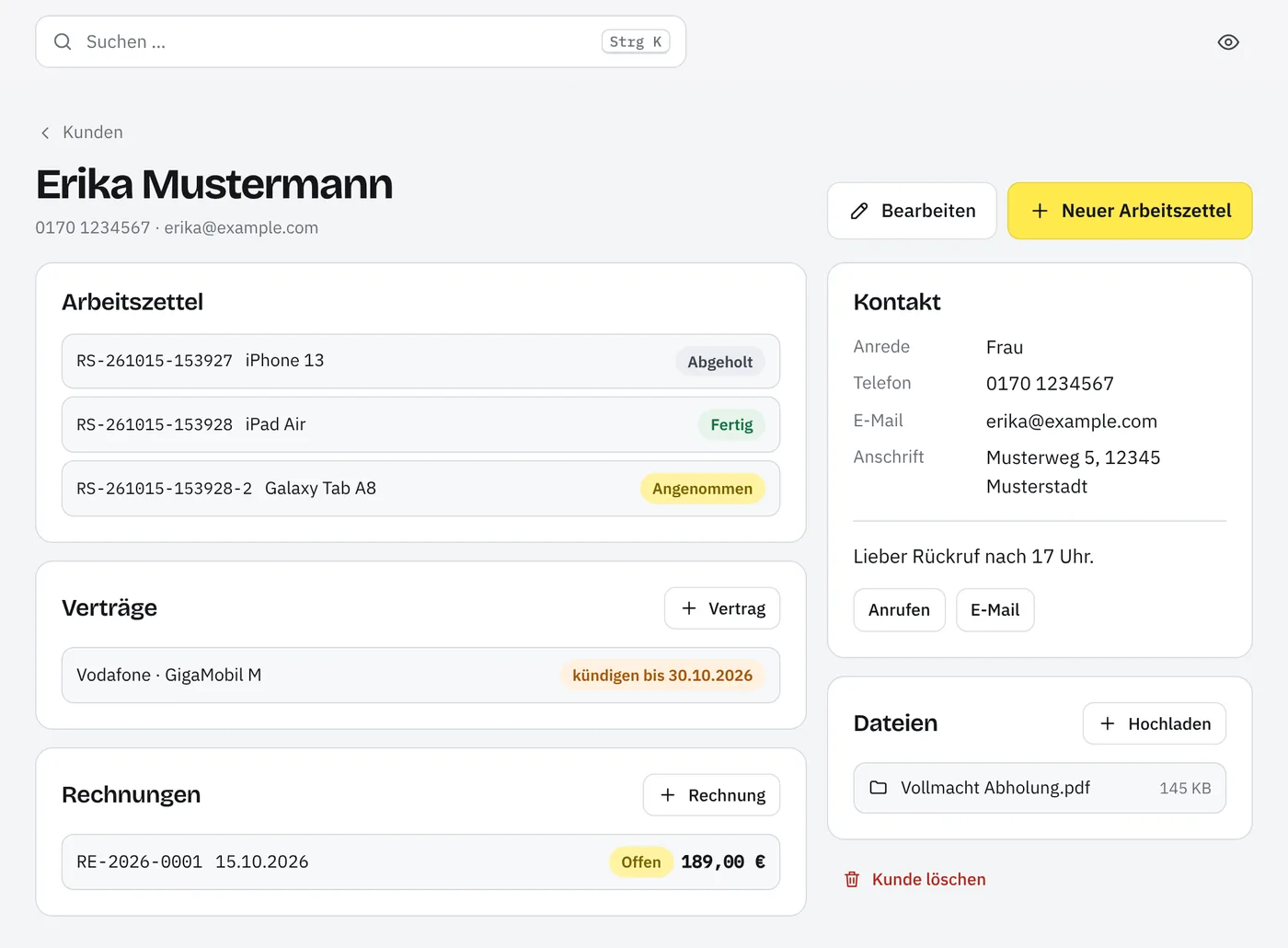
From the card you carry straight on: “New work order” opens the form with the customer's title, name, company, address, phone and email already filled in. “+ Contract” and “+ Invoice” create a contract or an invoice for them; on the invoice the recipient is already filled in. For contracts, Taskly reminds you by email before the notice period runs out.
Find customers: by name, company or number
In the “Customers” list, the search field filters by name, company, phone number and email as you type. Upper and lower case and accents don't matter: “sahin” also finds “Şahin”. With phone numbers, spaces and hyphens don't get in the way – “0170123” finds “0170 123 45 67”.
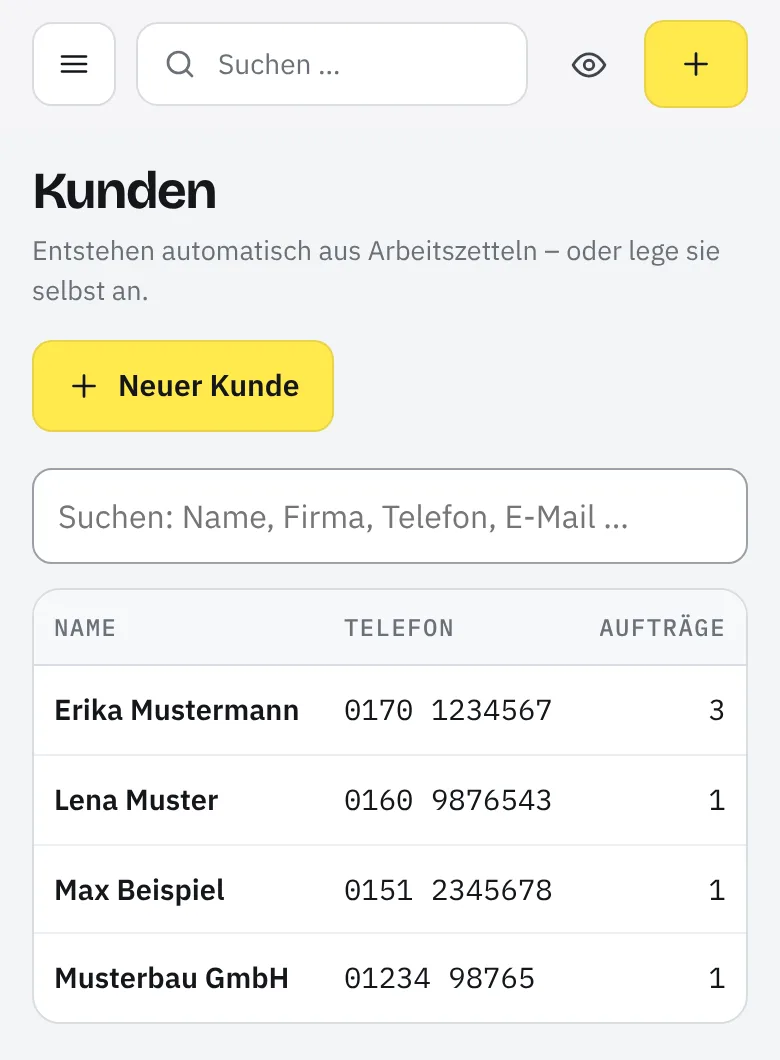
The list shows each customer's name, company, phone, email and the number of their jobs and contracts; on a phone, name, phone and jobs remain.
The search at the top of the app – also with Ctrl + K or ⌘ + K – searches everything at once: customers, work orders by job number, number plate or serial number, contracts by phone number or contract number, invoices and files.
Consents: they're on the job
Whether a customer wants to receive messages by email or SMS is their decision, made on their own phone, for example when signing via QR code or at self check-in. Taskly stores this choice on the respective work order, with the date. If they change their mind, you record it there with “Record withdrawal”. The customer card itself doesn't show consents; from its list of work orders you're at the right job with one tap.
Privacy mode: customer details on the counter screen
If the screen is positioned so that people waiting could read along, switch on privacy mode. Customer names and contact details – phone number, email, address – are then blurred and only readable when you hover over or tap them. It applies to the device in question and can be toggled with the eye icon at the top of the app or with the D key. Printouts aren't affected.
Who in the team can do what
- Everyone in the team sees the customer records, creates customers and edits cards.
- Deleting is only for owners and office staff. Only the card disappears: work orders, contracts and invoices remain, as do the files – they then appear unassigned under “Files”.
- The full export as a file, with all your customer records, is also reserved for owners and office staff.
Privacy
| Responsible | Your business is responsible for the customer data. Taskly processes it on your behalf; the data processing agreement under Art. 28 GDPR is part of signing up. |
|---|---|
| Storage location | The database and files are stored in the EU. |
| Notice to customers | The privacy information on the signing and self check-in pages mentions your business's customer records. |
| Export | “Everything as a file (JSON)” contains all customer cards; “Work orders as Excel (CSV)” lists the jobs with name and contact. |
| Deletion | The card with “Delete customer”, work orders and contracts individually. Issued invoices are cancelled instead of deleted. |
Details are in the privacy policy.
What the customer records are not
- Not a marketing CRM. There are no newsletters, campaigns or a sales pipeline. The records are the memory of your jobs.
- Not a treatment record. Fields for treatment histories or formulas, as found in beauty and hairdressing software, are missing; for notes there's the free notes field.
- No import of customer lists. An existing Excel list can't currently be imported; the records grow with every job.
- No merging at the push of a button. If a regular customer comes with a new number and an unknown email, a second card is created. So add new numbers to the existing card.
- Not a customer account. Your customers don't log in anywhere and don't see their card.
And Taskly as a whole isn't a till system, stock management or a car dealer management system, but the digital work order with everything that goes with it – all features at a glance.
Which businesses is it for?
For everyone whose customers come back: the phone shop with repairs and mobile contracts, the car workshop, the bike workshop, PC and laptop repair, electrical and plumbing & heating businesses, tailors, watchmakers and shoe repair & key cutting. Which fields the job has is set by your industry's template – all industries at a glance. New customers enter their contact details themselves via self check-in; when you copy them into a work order, they're in the records. If you'd rather stay on paper for now, you'll find the repair order as a printable template.
What the customer records cost
They're part of the Taskly subscription for €19 a month incl. VAT – try it free for 30 days, no credit card. Limits: 2 GB of storage per business and 25 MB per file. Pricing and limits in detail
Customer records FAQ
Do I have to create my customers myself?
No. As soon as you save a work order with a name and phone number or email, Taskly creates the customer card or attaches the job to an existing one. You can still do it by hand, for example for business customers: under “Customers” with “New customer”. Only the last name is required.
Does Taskly recognise a regular customer?
Yes, by the phone number – whether it's written with 0, with +49 or with spaces. Taskly only merges by email address if the name matches too. Taskly doesn't overwrite what's already on the card; it only fills in empty fields. If the customer has a new number, enter it on their card under “Edit” and Taskly will find them again with the next job.
Can I import my existing customer list from Excel?
Not at the moment – there's no import for customer lists yet. The records grow with every job, and you create regular customers with “New customer” as needed. You import existing mobile contracts with “Contracts from screenshot”; the matching customer cards are created along the way.
Who in the team sees the customer data?
Everyone with a login to your business: staff work with work orders, customers, contracts, invoices and files. Only owners and office staff can delete a customer card and export all data. So that people waiting at the counter can't read along, privacy mode blurs names and contact details on screen.
A customer asks for their data to be deleted. How does that work?
With “Delete customer” on their card you remove the card; owners and office staff can do this. Their work orders and contracts remain and can be deleted individually. Taskly doesn't delete issued invoices, they're cancelled – statutory retention periods usually apply to invoices. Which periods apply to your business is best clarified with your tax adviser; this information is no substitute for legal advice.
Can I export the customer records?
Yes. Under “Settings”, owners and office staff download all of the business's data with “Everything as a file (JSON)”, customer records included. “Work orders as Excel (CSV)” lists every job with name, company, phone and email. There's currently no separate Excel file with just the customers.
Do the customer records work on a phone too?
Yes. Taskly runs in the browser on tablet, phone and PC, nothing to install. On a phone, the customer list shows the name, phone number and number of jobs; on the card you call the customer directly with “Call”.
What do the customer records cost?
Nothing extra. The customer records are part of the Taskly subscription for €19 a month incl. VAT – along with team, contracts, automations and everything else. Try it free for 30 days, no credit card. Details are on the pricing page.
Last updated: 15/10/2026 · Taskly, E-Studio, Iserlohn