Download the work order – free, no sign-up
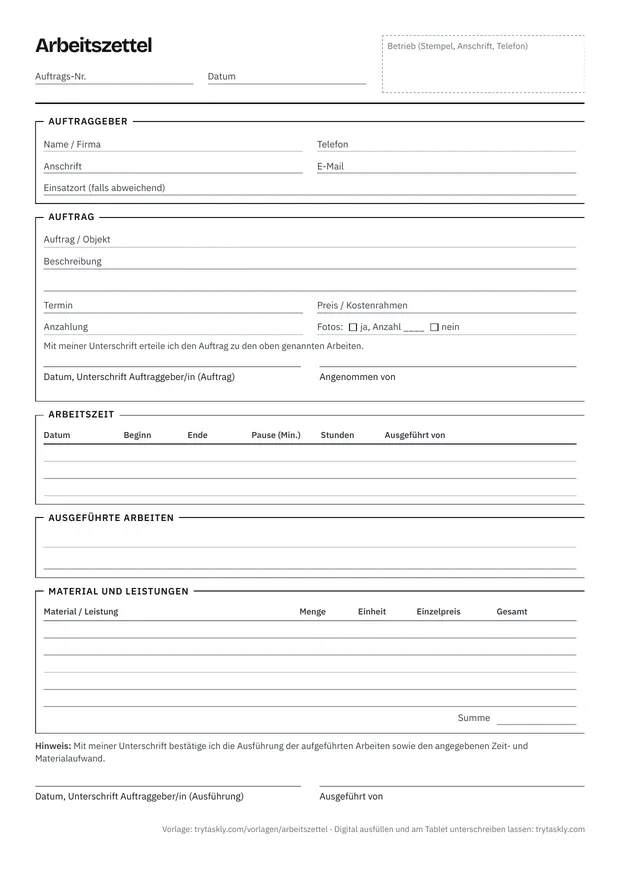
One A4 page for the counter and for jobs at the customer's site. At the top, the order: customer, job location, what needs doing, date, price and deposit. At the bottom, the execution: working time with start, end and break, work carried out, materials and services. Plus one signature each for the order and for the completed work.
You can print the form in your browser or save it as a PDF. You may use it for your business, adapt it and print it with your stamp or logo.
Work order or order form: what's the difference?
The two terms aren't strictly defined, and day to day they're often used interchangeably – as are job ticket, work instruction or job sheet. Usually, though, businesses mean two different points in time:
| Feature | Order form | Work order |
|---|---|---|
| When | before the work starts – at intake at the counter or at the appointment on site | during or after the work |
| What's on it | who is ordering, what needs doing, by when and at what price or cost limit | what was actually done: working time, materials and services |
| Customer signature | places the order | confirms the work and effort |
| What it's for | Clarity about what has been ordered – and what hasn't | Proof of the work and the basis for the invoice |
In many small businesses both are one sheet: the order at the top, the execution below. That's how this template is laid out too. If you only need one part, leave the other blank – for example if you only write up a short job afterwards.
The template is meant for both places where jobs come about: the counter, when a customer brings something in for repair or processing, and on-site jobs, such as an installation, a small repair at the customer's or caretaking. For on-site jobs there's the “Job location (if different)” field.
These details belong on the work order
| Detail | What it's for |
|---|---|
| Business (stamp), job number, date | Who is taking the order and when. The number links the work order and the invoice. |
| Customer: name or company, address, phone, email | For queries, the message when the work is done, and the invoice. |
| Job location, if different | If the work isn't done at the customer's address – for example in a rented flat or at a second site. |
| Job and description | What needs doing and on what, for example “replace back door lock” or “lawnmower won't start”. The more precise, the less dispute about what was ordered. |
| Date, price or cost limit, deposit | What was agreed: by when, at what price and what has already been paid. |
| “Order placed” signature, received by | The customer confirms the order; “Received by” shows who in the team took it. |
| Working time: date, start, end, break, carried out by | Documents the time spent – important if you bill by time and materials. Several lines in case the work runs over several days or several people work on it. |
| Work carried out | What was actually done – even if it differs from the order. |
| Materials and services: quantity, unit, unit price | What was fitted or used, plus flat rates such as a call-out charge. The invoice is built from this. |
| Photos | Condition before and after. On paper there's only a note that photos were taken – the pictures themselves are somewhere else. |
| “Work confirmed” signature, carried out by | The customer confirms the work as well as the time and materials. That's your proof if the invoice is later disputed. |
The work order doesn't replace an invoice – it's the basis for one. The mandatory details for an invoice are set out in § 14 of the German VAT Act (UStG). The notes on the form are a suggested wording and not legal advice. Adapt them to your business and have them checked if needed, for example through your chamber or a lawyer.
Work order with a carbon copy – or a copy by email?
Many businesses use work orders as carbon-copy sets: the original stays in the business, the customer gets the copy. The template here is a normal A4 sheet, not a carbon-copy set. For a copy, print two, photocopy the signed sheet or photograph it. If you need real carbon-copy sets, you can use the layout as a model for your printer.
Digitally, there's no need for a carbon copy. In Taskly, the customer signs with a finger on the tablet or via QR code on their own phone. If they gave an email address, they get the work order as a link by email and can view it there, print it or save it as a PDF. Photos aren't included in this link; they stay internal. You keep the work order in Taskly and print it on A4 if needed.
What a carbon-copy pad and a tablet cost day to day, and when paper remains the better choice, is covered in the comparison Carbon-copy pad or tablet?
The general work order in Taskly
In Taskly this template is called “General work order”; the printout says “Work order” with the subtitle “Order · Proof of work”. It's meant for every business and contains these fields:
| Section | Fields |
|---|---|
| Customer | Title, first name, last name, company, address, phone, email |
| Job | Job / item, description, price, deposit, date, received by (fills itself in), date received (pre-filled with today), work carried out |
| Working time | Date (pre-filled with today), start, end, break (minutes), carried out by (fills itself in) |
| Materials & services | Items with description, quantity, unit and unit price – Taskly calculates the total |
| Photos | Photos – taken on the tablet or with a phone via QR code |
| Signature | Customer signature – with a finger on the tablet or via QR code on their own phone |
No field is required – when you save, Taskly reminds you once about name, contact, job and signature; the signature can be added at any time. The note is pre-filled – “By signing, the customer confirms that the work listed has been carried out and confirms the time and materials stated.” – and can be changed. If you're missing a field, such as the job location, add it in the template builder or combine the template with another one.
How a work order runs in Taskly
- Create. Choose a template, enter the customer and job – by keyboard or dictation. For regular customers, start the work order directly from the customer records; their contact details are then already filled in.
- Work. Enter working time, materials and services, take photos on the tablet or with a phone via QR code. Taskly calculates the total of the items.
- Sign. The customer signs with a finger – on your tablet or phone, or via QR code on their own phone.
- Copy. If the customer gave an email address, they get the work order as a link by email. For your records, print it on A4 or save it as a PDF.
- Done and invoice. One tap on “Ready” and the customer is notified – by email; SMS is available on request for enabled businesses. You create an invoice from the job: the items are carried over, and the deposit as already paid.
What the customer sees when signing and what Taskly stores is explained on the customer signature on a tablet or the customer's phone page.
Taskly costs €19 a month or €190 a year (2 months free), each incl. VAT – one plan, all features, cancel monthly, with annual payment at the end of the 12 months. You try it free for 30 days with no credit card; the trial ends automatically without anything being charged. Your data stays readable and exportable afterwards. Limits: 2 GB of storage per business and 25 MB per file. Details are under pricing.
What Taskly is not
Taskly replaces the paper work order and everything that goes with it: job, signature, photos, status, copy for the customer and the invoice from the job. Taskly doesn't include time tracking for payroll, project or site management, a till system or stock management – and for car workshops no dealer management system with a parts catalogue either. If you need all that in one program, trade or industry software will serve you better.
Templates for specific industries
The general work order fits almost any job. In some industries, though, further details belong on the sheet:
- Repairs at the counter – phones, computers, electronics, bikes, watches: item, serial or IMEI number, accessories and condition at intake. For this there's the repair order template and, for phone shops, the phone repair order.
- Car workshop – number plate, VIN, mileage and approval amount belong in the workshop order for car workshops.
- Trades on site – electrical, plumbing/heating/air-con, painting, joinery: in Taskly there are job sheets for these with the job location, for electricians with readings, for example, and for painters with area and colour shade.
- Gardening, caretaking and cleaning – service records with the property and services to tick off.
All 16 templates are under industries. For phone shops there's also the software for phone repair page, for car workshops digital workshop orders, for bike workshops software for bike workshops.
Work order FAQ
Is the work order template really free?
Yes. You print the A4 sheet with the two signatures – one for the order, one for the completed work – straight from the browser or download it as a PDF, no sign-up. Using it, adapting it and printing it with your stamp or logo is allowed.
Is the work order available as a Word or Excel file?
No, only as a printable form in the browser and as a PDF. The tables for working time and materials are meant to be filled in with a pen. If you'd rather let a device do the maths: in Taskly, the materials and services block calculates the total from quantity and unit price itself, and you change fields in the template builder – no Word or Excel.
Is the work order also available with a carbon copy?
The template is a normal A4 sheet, not a carbon-copy set. For a copy, print two or photocopy or photograph the signed sheet. In Taskly you don't need a carbon copy: the customer gets the work order as a link by email and can print it there or save it as a PDF.
Does the customer have to sign the work order?
As a rule it isn't required – an order can also be agreed verbally. But the signature is your proof: it shows what was ordered and that the customer confirmed the working time and materials. Especially if you bill by time and materials, this helps if hours or materials are disputed later. This information is no substitute for legal advice.
May the customer sign on a tablet or phone?
Yes, for work orders and order forms there's usually no particular form required. It's especially handy on site: the customer confirms hours and materials with a finger on your phone or tablet, or scans a QR code and signs on their own. Where statutory written form is required in exceptional cases, that's not enough. This information is no substitute for legal advice.
How long do I have to keep work orders?
If you bill by time and materials, the signed work order is usually the basis of the invoice: it documents hours and materials. Then, like the invoice, you generally keep it as an accounting record for eight years (§ 147 of the German Fiscal Code). If it only serves to record the work, it's still worth keeping for as long as the customer can make claims for defects – often two years from acceptance, five years for work on a building (§ 634a BGB). What applies to your sheets is best clarified with your tax adviser; not legal advice.
Can I fill in the work order on my phone at the customer's site?
Yes. Taskly runs in the browser on phone, tablet and PC – nothing to install. Taskly needs an internet connection to save. If it drops, the form stays filled in, and Taskly also keeps a new work order as a draft on the device. As soon as the connection is back, you save.
What does the digital version cost?
Taskly costs €19 a month incl. 19% VAT per business – one plan with all features, cancel monthly. If you pay annually, it's €190 a year – 2 months free – 17% cheaper; you pay the 12 months in advance. You try it free for 30 days with no credit card; the trial ends automatically and nothing is charged. After that, your data stays readable and exportable – to keep working, you take out the subscription. Full details are on the Pricing page.
Last updated: 30/10/2026 · Taskly, E-Studio, Iserlohn